
What is CloudFront?
Amazon CloudFront is AWS’s content delivery network (CDN) service.
It improves read performance by caching content at edge locations closer to users.
- Supports both static and dynamic content delivery
- Routes users to edge locations with the lowest latency
- Helps reduce load on the origin by serving cached content from the edge
Security and protection
CloudFront includes several security-related features and integrations.
- Integrates with AWS Shield for DDoS protection
- Can be associated with AWS WAF to inspect and filter web requests
- Supports HTTPS for viewers
- Can also use HTTPS when communicating with supported origins
Important
CloudFront can secure both the viewer-to-CloudFront connection and, when supported by the origin type, the CloudFront-to-origin connection.
Field-level encryption
Field-level encryption adds another layer of protection on top of HTTPS.
- Encrypts specific sensitive fields in requests
- Encryption happens at the edge, closer to the user
- Uses asymmetric encryption
- Helps ensure that only authorised applications can decrypt sensitive fields
Important
HTTPS protects data in transit, while field-level encryption can additionally protect specific sensitive fields throughout the processing path.
Origins
CloudFront can serve content from different origin types.
S3 bucket origin
Use an Amazon S3 bucket origin when you want CloudFront to cache and distribute files from S3.
- Good for distributing files globally with edge caching
- Recommended to secure S3 origins using Origin Access Control (OAC)
- Origin Access Identity (OAI) still exists, but it is considered legacy
- OAC supports additional scenarios such as SSE-KMS and dynamic requests like
PUTandDELETE
Important
For S3 origins, prefer OAC over OAI. OAI is legacy and no longer the recommended choice.
Custom origin
Use a custom origin when the backend is not a standard S3 bucket origin.
Examples include:
- Application Load Balancer
- EC2 instance
- S3 static website endpoint
- Any other HTTP/HTTPS backend
HTTPS to origin
For custom origins, CloudFront supports:
- HTTP only
- HTTPS only
- Match Viewer
Note
An S3 website endpoint is treated as a custom origin, and S3 website endpoints do not support HTTPS from CloudFront to the origin.
Multiple origins
A single CloudFront distribution can use multiple origins.
This is useful when you want to route requests to different backends based on the request pattern.
Common use cases
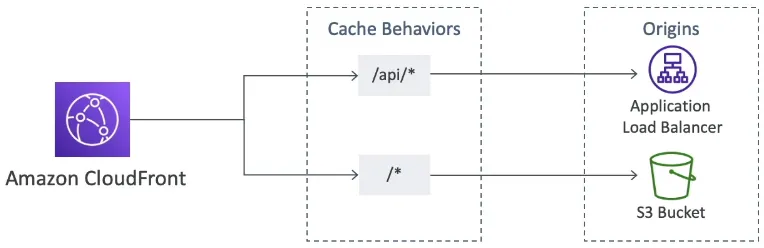
- Send
/images/*to an S3 origin - Send
/api/*to an ALB or EC2 backend - Split static and dynamic content across different origins
Origin groups
Origin groups are used for high availability and failover.
- An origin group contains one primary and one secondary origin
- CloudFront sends requests to the primary origin first
- If the primary origin fails or returns configured failure status codes, CloudFront fails over to the secondary origin
Important
CloudFront origin failover applies only to viewer requests that use GET, HEAD, or OPTIONS.
Geo restriction
CloudFront can restrict access to content based on the viewer’s country.
Types
- Allowlist: only users from approved countries can access the content
- Block list: users from blocked countries cannot access the content
Note
CloudFront geographic restriction works at the country level. If you need finer-grained geographic control, AWS recommends using a third-party geolocation solution.
Price classes
CloudFront price classes let you reduce cost by limiting which edge locations are used.
Types
- Price Class All: all edge locations, best performance
- Price Class 200: excludes some of the most expensive locations
- Price Class 100: uses only the least expensive group of locations
Tip
A common exam trade-off is this: lower price classes reduce cost, but may increase latency for some users.
Signed URLs and signed cookies
CloudFront signed URLs and signed cookies are used to restrict access to private content.
Signed URL
Use when you want to control access to individual files.
- One signed URL is typically used for one file or one resource path
- Common for downloads or access to a single protected asset
Signed cookie
Use when you want to control access to multiple files.
- Better when users need access to a group of protected files
- Useful for streaming, paid content, or authenticated sessions across multiple assets
Access control details
CloudFront signed URLs and signed cookies can include:
- an expiration time
- an optional start time
- an optional IP address range restriction
AWS recommends using trusted key groups for signing.
Important
Choose signed URLs for access to individual files, and signed cookies when the user needs access to multiple files.
CloudFront vs S3 pre-signed URL
CloudFront signed URLs and S3 pre-signed URLs are not the same.
- CloudFront signed URLs are used to control access through the CDN
- S3 pre-signed URLs give direct temporary access to S3 objects
Note
If the question is about protecting content delivered through a CDN, think CloudFront signed URLs or cookies, not S3 pre-signed URLs.