
What is EFS?
Amazon Elastic File System (EFS) is AWS’s managed file storage service that provides shared, elastic file storage for multiple compute instances.
It is a managed Network File System (NFS) that can be mounted by multiple clients at the same time.
- EFS uses the NFSv4 protocol.
- Multiple EC2 instances can access the same EFS file system concurrently.
- EFS is commonly used when multiple instances need shared access to the same files.
- EFS is designed to scale automatically as your file system grows.
Note
Think of EFS as shared file storage for EC2, whereas EBS is typically attached to one instance at a time.
Compatibility
EFS can be mounted from supported EC2 clients using NFS.
- Supported for Linux-based EC2 instances.
- Supported for EC2 macOS instances.
- ❌ Not supported for Windows–based EC2 instances.
Important
If an exam question asks for a shared file system for Windows EC2 instances, EFS is not the right answer.
File system types
EFS offers two file system types.
Types
- Regional: stores data across multiple Availability Zones within the same Region and is the recommended option for higher availability.
- One Zone: stores data in a single Availability Zone and is lower cost, but less resilient than Regional.
Note
Use Regional when you want multi-AZ resilience. Use One Zone only when lower cost matters more than multi-AZ durability.
Storage classes and lifecycle management
EFS supports lifecycle management to move files between storage classes automatically based on access patterns.
Storage classes
- EFS Standard: for frequently accessed files and the lowest latency.
- EFS Infrequent Access (IA): for files accessed only occasionally.
- EFS Archive: for very infrequently accessed files.
Key points
- Lifecycle management can automatically move files from Standard to IA and then to Archive.
- By default, AWS’s recommended lifecycle policy transitions files to IA after 30 days and to Archive after 90 days without access.
- Files can also be configured to move back to Standard on first access.
Tip
A good way to remember this: Standard for active data, IA for cold data, Archive for very cold data.
Performance modes
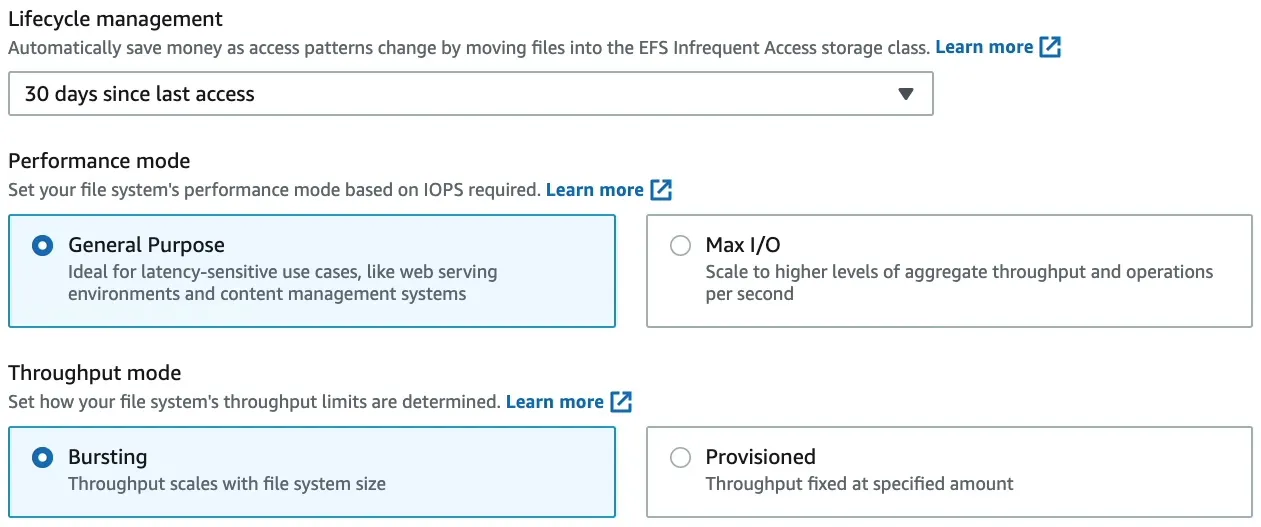
EFS provides two performance modes.
Types
- General Purpose (Default & Recommended): best for latency-sensitive workloads such as web servers, CMS workloads, and general file serving.
- Max I/O: designed for highly parallel workloads that can tolerate higher latency.
Key points
- AWS recommends General Purpose for most workloads.
- Max I/O is considered a previous-generation option.
- The performance mode is set at creation time and cannot be changed later.
- Max I/O is not supported for One Zone file systems or file systems using Elastic throughput.
Important
For most exam scenarios, choose General Purpose unless the question clearly describes a highly parallel workload that can tolerate higher latency.
Throughput modes
Throughput mode determines how much throughput the file system can deliver.
Types
- Elastic (Default & Recommended): throughput scales automatically up or down with workload demand.
- Provisioned: you specify the throughput you want, independent of storage size. Useful when you need predictable throughput regardless of file system size.
- Bursting: throughput scales with the amount of data stored in EFS Standard.